

Businesses are increasingly turning to automation software to reduce operating costs, improve productivity, manage customers, and eliminate repetitive administrative work.
In 2026, business automation is no longer limited to large corporations with dedicated IT departments. Small businesses, startups, online retailers, marketing agencies, and independent entrepreneurs are also using automation tools to handle tasks that once required several employees.
The latest generation of business automation platforms goes beyond connecting applications. Many now incorporate artificial intelligence (AI), intelligent workflow management, robotic process automation (RPA), and automated decision-making.
These capabilities allow companies to automate everything from customer inquiries and sales follow-ups to invoice processing, employee onboarding, inventory updates, and internal reporting.
However, not every automation platform is suitable for every organization. Some products are incredibly easy to use but become expensive as businesses grow. Others offer extensive customization but require technical expertise to configure and maintain.
This review examines 10 of the leading business automation tools worth considering in 2026 and 2027. It explores their major features, ideal users, advantages, disadvantages, and the reasons businesses love or dislike them.
Editorial note: This is a comparative industry review based on available product information, software-market coverage, and user-review data. It is not a claim that every platform was independently tested in a live business environment. Product pricing and features may change.
What Is Business Automation Software?
Business automation software is technology that helps organizations perform repetitive activities with minimal human involvement. It uses predefined instructions, triggers, integrations, artificial intelligence, and workflow rules to complete tasks automatically.
For example, an online store can use automation to send an order confirmation when a customer purchases a product, update inventory, notify the shipping department, and send a delivery notification when the order is dispatched.
A marketing agency can automate lead collection, assign prospects to sales representatives, schedule follow-up emails, and generate performance reports.
The main objective is to allow employees to spend less time handling repetitive activities and more time working on tasks that require creativity, judgment, communication, and strategic planning.
How We Selected the Top 10 Business Automation Tools
The following products were selected based on their automation capabilities, integration options, flexibility, suitability for different business sizes, AI features, and available customer feedback.
The selection includes general workflow automation platforms, enterprise integration systems, customer relationship management solutions, and robotic process automation products.
According to G2's 2026 process automation listings, UiPath, Microsoft Power Automate, Automation Anywhere, and Zapier are among the notable platforms with substantial user-review activity. G2+1
1. Zapier – Best Overall for Easy Business Automation
Best for beginners and small businesses
Zapier is one of the most recognizable names in workflow automation. Its biggest selling point is its ability to connect thousands of applications and make them work together without requiring users to write complicated code.
Businesses use Zapier to connect applications such as Gmail, Google Sheets, Slack, HubSpot, Shopify, Trello, and hundreds of other services.
Its automation workflows are called Zaps. A Zap typically begins with a trigger, such as receiving a new email, submitting a form, or recording a new customer purchase. The platform then performs one or more actions based on that trigger.
For example, a company can automatically transfer information from a website contact form into its CRM, notify the sales team through Slack, and send an acknowledgment email to the potential customer.
Major features
- More than 9,000 app integrations.
- No-code workflow creation.
- Multi-step automation.
- Conditional workflow logic.
- AI-powered automation capabilities.
- Automated data transfers between applications.
- Workflow monitoring and error notifications.
- Business and enterprise administration features.
Why businesses love Zapier
The biggest advantage is accessibility. Employees without programming experience can create useful automations in a relatively short time.
Small businesses particularly appreciate the ability to connect their existing applications without hiring developers to build custom integrations.
Another attraction is its extensive integration library. Businesses do not have to replace their existing software simply because they want to automate processes.
Zapier also makes it possible to automate activities across different departments, including marketing, customer support, administration, and sales.
Why businesses hate Zapier
The biggest complaint is cost, particularly when automation becomes a regular part of daily operations.
Zapier's usage-based pricing can become expensive when a business processes thousands of tasks. Companies must also understand which actions count toward their usage limits before building high-volume workflows.
Another limitation is that complex workflows can become difficult to organize and troubleshoot. While Zapier is excellent for connecting applications, businesses with sophisticated integration requirements may eventually need a more advanced platform.
Who should use it?
Zapier is suitable for startups, small businesses, marketing agencies, freelancers, online stores, and companies that want to automate everyday tasks without employing software developers.
Verdict: Zapier is an excellent starting point for business automation. Its accessibility and integration ecosystem make it particularly attractive to organizations that want quick results without a complicated technical setup.
Official website: Zapier
2. Microsoft Power Automate – Best for Microsoft 365 Businesses
Best for Microsoft-based organizations
Microsoft Power Automate is a powerful automation platform designed to help organizations streamline business processes across their software environments.
It is particularly attractive to companies already using Microsoft 365, SharePoint, Outlook, Teams, Excel, and Dynamics 365.
The platform supports cloud-based workflows as well as desktop automation. This means businesses can automate activities between online applications and certain traditional desktop programs.
For example, a company can automatically collect information from an online form, save the details in SharePoint, notify a manager through Microsoft Teams, and request approval before proceeding with a purchase.
Power Automate also supports robotic process automation, allowing businesses to automate repetitive interactions with applications that may not offer modern API integrations.
Major features
- Cloud-based workflow automation.
- Desktop robotic process automation.
- Microsoft 365 integrations.
- Automated approvals and notifications.
- AI-powered workflow assistance.
- Document processing.
- Process mining and workflow analysis.
- Enterprise administration and security controls.
Why businesses love Microsoft Power Automate
Its biggest advantage is its integration with Microsoft's business ecosystem.
Companies already paying for Microsoft products can build automation around familiar applications rather than introducing an entirely different technology environment.
The platform is also useful for approval processes. Managers can receive notifications, review requests, and approve or reject activities without relying on lengthy email conversations.
Its desktop automation capabilities are another major attraction, especially for organizations that still depend on older applications.
Why businesses hate Microsoft Power Automate
Power Automate has a learning curve. Although it provides low-code tools, creating sophisticated workflows requires an understanding of connectors, permissions, expressions, and automation logic.
Licensing is another potential frustration. Different automation capabilities may require different plans, and businesses must understand their existing Microsoft subscriptions before estimating the actual cost.
Some users may also find troubleshooting difficult when workflows involve multiple applications, security permissions, and complex conditional instructions.
Who should use it?
Medium-sized businesses, corporations, accounting departments, human resources teams, government organizations, and companies already using Microsoft 365.
Verdict: Power Automate is one of the strongest options for organizations operating within Microsoft's ecosystem. Its combination of cloud workflows and desktop automation makes it more versatile than a simple app-connection service.
Official website: Microsoft Power Automate
3. n8n – Best for Technical Teams and Self-Hosted Automation
Best for developers and technical entrepreneurs
n8n has become an attractive option for businesses that want more control over their automation infrastructure.
Unlike platforms that focus primarily on ready-made integrations, n8n provides a visual workflow editor that allows users to connect applications, manipulate data, introduce custom logic, and build advanced automated processes.
One of its strongest selling points is self-hosting. Businesses can install n8n on their own infrastructure instead of relying entirely on a third-party cloud service.
This can be particularly useful for organizations that have specific data-management, infrastructure, or customization requirements.
n8n also supports AI-related workflows, allowing businesses to connect language models, external services, databases, and other tools.
Major features
- Visual node-based workflow builder.
- Self-hosting options.
- More than 1,900 integrations and community nodes, according to its 2026 product coverage.
- Custom JavaScript functionality.
- API and webhook support.
- AI agent workflow capabilities.
- Data transformation.
- Complex conditional automation.
Why businesses love n8n
Flexibility is its biggest attraction.
Developers can create workflows that go beyond basic trigger-and-action automation. They can manipulate information, connect APIs, introduce custom JavaScript, and build complicated processes.
Self-hosting also gives technically capable businesses more control over their infrastructure and data-handling arrangements.
Another advantage is its usefulness for AI-powered business systems. Companies can connect AI models to customer databases, content-management systems, internal applications, and other services.
Why businesses hate n8n
The main disadvantage is that it is not always beginner-friendly.
Although the visual interface makes workflows easier to understand, advanced automation can require knowledge of APIs, databases, authentication, and programming.
Self-hosting also creates responsibilities. Businesses must manage servers, backups, security updates, and infrastructure maintenance.
The Community edition's licensing terms should also be reviewed carefully, particularly by organizations intending to use it in commercial products or offer automation services to customers.
Who should use it?
Software developers, technology startups, digital agencies, IT departments, and businesses that need customizable AI-powered workflows.
Verdict: n8n is an excellent choice for organizations that value customization and infrastructure control. However, businesses without technical resources should carefully consider its maintenance requirements before adopting it.
Official website: n8n
4. Make – Best for Complex Visual Workflows
Make, formerly known as Integromat, is a visual automation platform that allows businesses to connect applications and build sophisticated workflows.
Its biggest distinction is its visual scenario builder. Instead of presenting automation as a simple list of steps, Make displays workflows as interconnected modules.
This approach allows users to see how information travels between applications and where different actions take place.
Businesses can use Make to automate customer onboarding, marketing campaigns, e-commerce operations, data synchronization, and internal reporting.
For example, a company could build a workflow that receives an order, checks customer information, updates inventory, sends a payment confirmation, and routes unusual orders for manual review.
Major features
- Visual drag-and-drop workflow builder.
- Conditional routing and filtering.
- Multi-step scenarios.
- API and webhook integrations.
- Data transformation.
- Scheduling and automation monitoring.
- AI-powered workflow capabilities.
- Integration with popular business applications.
Why businesses love Make
Make is particularly attractive to users who want more control over how their workflows operate.
Its visual interface makes it easier to understand complicated automation processes involving several applications and conditional decisions.
Businesses also appreciate the flexibility to create multiple branches within a single workflow.
Compared with basic automation tools, this can make it easier to manage processes where different customers, orders, or requests require different actions.
Why businesses hate Make
The visual builder can become overwhelming when workflows grow too large.
New users may also struggle to understand operations, data mapping, filters, and error handling.
Another issue is its credit-based usage model. Businesses running complex or high-volume scenarios need to monitor consumption because individual operations can add up.
This means a workflow that looks inexpensive during initial testing may become more costly when used extensively.
Who should use it?
Marketing agencies, e-commerce companies, startups, consultants, and businesses that need more sophisticated automation than basic trigger-and-action systems provide.
Verdict: Make is one of the most attractive alternatives to Zapier for businesses that prioritize visual workflow design and customization. It is particularly useful when automation involves multiple conditions and branches.
Official website: Make
5. UiPath – Best for Enterprise Robotic Process Automation
Best for large organizations
UiPath is one of the leading platforms in robotic process automation. It helps organizations automate repetitive activities that would otherwise require employees to interact with computer applications manually.
Unlike conventional workflow tools that primarily connect applications through APIs, UiPath can automate certain tasks by interacting directly with software interfaces.
This is especially valuable for businesses that depend on older applications that do not offer modern integration options.
For example, an insurance company can use automation robots to extract information from documents, enter customer details into internal systems, validate records, and generate reports.
UiPath is also expanding its capabilities around AI-powered automation and the coordination of automated agents, robots, and human workers.
Major features
- Robotic process automation.
- Automated document processing.
- Visual automation development.
- AI-powered workflow capabilities.
- Process discovery and analysis.
- Enterprise automation management.
- Human approval and intervention.
- Integration with business applications.
Why businesses love UiPath
Its ability to automate repetitive tasks across existing applications is a major advantage.
Large organizations often operate with several software systems that were introduced at different times. Replacing all of them can be expensive and disruptive.
UiPath provides another option by allowing companies to automate interactions with these systems.
Businesses also appreciate its ability to handle repetitive document-processing and data-entry activities, particularly in banking, insurance, healthcare administration, and other document-heavy industries.
G2's 2026 business automation listings place UiPath among the leading products, with a reported rating of 4.6 out of 5 in its category. G2+1
Why businesses hate UiPath
Implementation can be complicated.
Organizations may need trained automation developers, infrastructure specialists, and business analysts to design and maintain sophisticated automation projects.
Another challenge is that interface-based automation can become unreliable when software screens, layouts, or application behavior change.
Licensing and implementation costs can also make UiPath difficult to justify for small companies with relatively simple processes.
Who should use it?
Banks, insurance companies, large retailers, healthcare organizations, financial institutions, and corporations with repetitive processes involving multiple legacy applications.
Verdict: UiPath is a strong enterprise automation solution. Its greatest value comes from automating tasks that ordinary app integrations cannot easily handle. It is generally more suitable for established organizations than small businesses looking for inexpensive automation.
Official website: UiPath
6. HubSpot – Best for Sales, Marketing, and Customer Service
Best for customer management
HubSpot is a customer relationship management platform that combines marketing, sales, customer service, content management, and business automation features.
Its biggest advantage is that businesses can manage several customer-related activities from a connected environment.
For example, when someone submits a contact form on a company's website, HubSpot can automatically create a contact record, assign the lead to a salesperson, send a welcome email, and schedule follow-up activities.
This makes it especially useful for companies that depend on consistent communication with potential and existing customers.
Major features
- Customer relationship management.
- Automated email marketing.
- Sales pipeline automation.
- Lead management and scoring.
- Customer service ticket automation.
- Marketing campaign workflows.
- Customer segmentation.
- AI-assisted business tools and reporting.
Why businesses love HubSpot
The biggest attraction is its combination of CRM and automation.
Rather than maintaining separate systems for customer information, sales activities, and marketing campaigns, businesses can manage many of these activities through one platform.
Its workflow builder also makes it easier to create automated customer journeys.
Marketing departments can nurture leads, sales representatives can receive notifications about interested prospects, and support teams can organize customer requests.
Another advantage is its accessibility. Companies can begin with basic CRM functionality and introduce more advanced capabilities as their requirements increase.
Why businesses hate HubSpot
Pricing is one of the biggest concerns.
Although HubSpot offers free tools, advanced marketing automation and other professional capabilities can become expensive.
Businesses should also consider the costs associated with additional contacts, users, and product upgrades.
Another concern is that companies can become heavily dependent on the platform after moving their customer records, marketing processes, and sales operations into its ecosystem.
Some organizations may find that they are paying for capabilities they do not fully use.
Who should use it?
Marketing agencies, software companies, online retailers, consultants, professional service providers, and businesses with dedicated sales teams.
Verdict: HubSpot is an excellent option for organizations that want to automate customer acquisition and relationship management. However, smaller businesses should examine its advanced subscription costs before committing to a long-term setup.
Official website: HubSpot
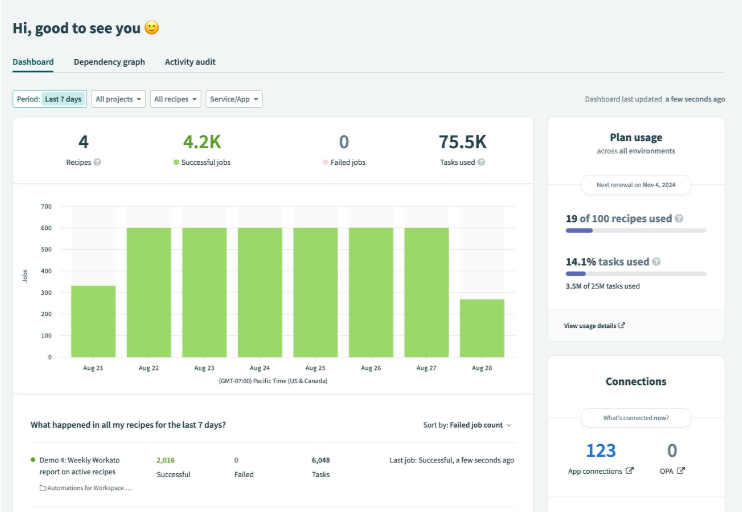
7. Workato – Best for Enterprise Application Integration
Workato is an enterprise-focused automation and integration platform designed to connect business applications, databases, and enterprise systems.
It is particularly useful for organizations operating with complex software environments.
Its automation workflows are known as recipes. These recipes allow businesses to define triggers, actions, conditions, and data transformations across connected applications.
For example, a company can synchronize employee information between its human resources platform, payroll software, identity management system, and internal communication tools.
Workato also supports more sophisticated integration requirements involving enterprise resource planning, customer relationship management, and other corporate applications.
Major features
- Enterprise application integration.
- Visual workflow automation.
- Prebuilt application connectors.
- API and data integration.
- Complex business process orchestration.
- Enterprise administration and governance.
- Automated data synchronization.
- AI-related automation capabilities.
Why businesses love Workato
Workato's biggest advantage is its ability to connect different business systems and coordinate processes across departments.
Organizations with multiple enterprise applications can use it to reduce manual data transfers and improve information consistency.
Its recipe-based approach also makes it possible to reuse automation logic across different business processes.
G2's 2026 iPaaS listings report a 4.7 out of 5 rating for Workato, reflecting strong user feedback in the integration-platform category. G2
Why businesses hate Workato
The biggest challenge is complexity.
Although its visual builder makes workflows easier to understand, advanced integrations can require considerable technical knowledge.
Implementation may also take time, particularly when businesses need to connect several enterprise applications and establish appropriate security controls.
Another disadvantage is pricing transparency. Workato generally requires businesses to request a quote, making it harder for smaller organizations to estimate costs before speaking with its sales team.
Who should use it?
Large corporations, multinational companies, financial institutions, enterprise IT departments, and businesses operating across several major software systems.
Verdict: Workato is a powerful enterprise automation platform, especially for organizations that need reliable connections between complex business applications. Its implementation requirements and custom pricing make it less attractive to smaller businesses.
Official website: Workato
8. Airtable – Best for Data-Driven Business Workflows
Airtable combines the familiarity of spreadsheets with the capabilities of a relational database and workflow management platform.
It allows businesses to organize information, build custom applications, manage projects, and automate processes.
Its flexibility makes it useful for companies that want to create internal systems without developing everything from scratch.
A marketing agency, for example, can use Airtable to maintain a content calendar, track campaign progress, assign tasks, and automatically notify team members when deadlines approach.
An e-commerce business can use it to organize product information, supplier details, and operational tasks.
Major features
- Spreadsheet-style database management.
- Workflow automation.
- Custom interfaces and dashboards.
- Project and task management.
- Application integrations.
- Data organization and reporting.
- AI-powered capabilities.
- Team collaboration.
Why businesses love Airtable
Airtable's biggest attraction is flexibility.
Businesses can build databases and operational systems that match their particular requirements rather than adjusting every process to fit a rigid software structure.
Its spreadsheet-style interface also makes it relatively approachable for employees who already understand tools such as Microsoft Excel and Google Sheets.
Another advantage is its ability to combine information management with automation. This makes it useful for managing projects, content production, customer records, and internal operations.
Why businesses hate Airtable
The platform can become expensive as the number of users and advanced requirements increases.
Another challenge is that Airtable is not a complete replacement for every database or enterprise resource planning system.
Businesses with complicated data relationships or high-volume transactional requirements may eventually need more specialized infrastructure.
There can also be a learning curve when building sophisticated interfaces, relational databases, and multi-step automation.
Who should use it?
Creative agencies, project management teams, media organizations, startups, marketing departments, and businesses that need flexible internal databases.
Verdict: Airtable is a strong choice for businesses that want to combine data management, collaboration, and automation. Its greatest advantage is flexibility, although companies with advanced database requirements should evaluate its limitations carefully.
Official website: Airtable
9. Automation Anywhere – Best for AI-Driven Enterprise Automation
Automation Anywhere is an enterprise automation platform that combines robotic process automation, artificial intelligence, document processing, and workflow orchestration.
Its primary objective is to help organizations automate business activities that involve several applications, documents, and decision-making stages.
For example, a financial institution can use automation to process incoming documents, extract relevant information, validate records, and send exceptions to employees for review.
The platform is also developing more advanced agentic automation capabilities, which allow AI-powered systems to participate in business workflows rather than simply execute fixed instructions.
Major features
- Robotic process automation.
- AI-powered process automation.
- Intelligent document processing.
- Workflow orchestration.
- Business process discovery.
- Automated data extraction.
- Enterprise governance.
- Human oversight and intervention.
Why businesses love Automation Anywhere
The platform is attractive to organizations that need to automate large volumes of repetitive work.
Its ability to combine bots, document processing, and AI-powered workflows makes it useful for departments handling substantial amounts of administrative information.
Businesses can use it to reduce manual data entry, improve processing speed, and standardize repetitive procedures.
It also offers a more comprehensive approach to automation than basic application-connection tools.
G2's 2026 listings report a 4.5 out of 5 rating for Automation Anywhere in the business automation platform category.
Why businesses hate Automation Anywhere
Its enterprise orientation can make implementation difficult for smaller companies.
Organizations may need specialized technical employees to design, deploy, monitor, and maintain automation projects.
The cost of deployment, training, and ongoing administration can also become significant.
Another concern is that AI-driven automation requires proper supervision. Businesses should not assume that an automated system can independently make every decision correctly, particularly when financial, legal, or customer-sensitive information is involved.
Who should use it?
Large corporations, banks, insurance companies, government agencies, and businesses with high-volume document-processing and administrative requirements.
Verdict: Automation Anywhere is a serious contender for enterprise automation. It is particularly attractive to organizations that want to combine traditional software robots with newer AI-driven business processes.
Official website: Automation Anywhere
10. monday.com – Best for Project and Team Management Automation
monday.com is a work management platform that helps businesses organize projects, coordinate employees, track progress, and automate repetitive team activities.
Its automation capabilities allow companies to create rules that trigger actions when particular conditions are met.
For example, when an employee completes a task, monday.com can automatically update the project status, notify the project manager, and assign the next activity to another team member.
This makes it particularly useful for businesses that manage several projects simultaneously.
Major features
- Project and task management.
- Automated task assignments.
- Workflow notifications.
- Custom dashboards.
- Project progress tracking.
- Team collaboration.
- Application integrations.
- AI-powered work management capabilities.
Why businesses love monday.com
Its user-friendly interface is one of its strongest advantages.
Employees can quickly understand project boards, deadlines, responsibilities, and workflow statuses.
The automation features also help reduce the amount of manual coordination required between team members.
Managers can create rules that automatically assign tasks, update statuses, and send reminders.
Another advantage is its flexibility. Businesses can adapt the platform to different departments, including marketing, operations, human resources, and project management.
Why businesses hate monday.com
The platform may not be powerful enough for organizations seeking advanced enterprise integration or complicated back-end automation.
Some businesses may also find its pricing structure difficult to manage as teams grow, particularly when they need additional users and premium features.
Another potential problem is that poorly organized boards can become cluttered. Companies need to establish clear project structures and workflow rules to get the most from the platform.
Who should use it?
Marketing agencies, creative teams, project managers, startups, remote businesses, and organizations that need better coordination between employees.
Verdict: monday.com is a practical choice for businesses that want to automate project management and team collaboration. It is not a substitute for every enterprise automation platform, but it can significantly reduce administrative work associated with managing projects.
Official website: monday.com
Business Automation Tools Compared: Which One Should You Choose?
The following table summarizes the strengths and limitations of the 10 platforms reviewed.
| Automation tool | Best use | Main advantage | Main drawback |
|---|---|---|---|
| Zapier | General business automation | Extensive integrations | Usage costs |
| Microsoft Power Automate | Microsoft businesses | Microsoft ecosystem integration | Licensing complexity |
| n8n | Technical automation | Customization and self-hosting | Requires technical knowledge |
| Make | Complex workflows | Visual workflow builder | Credit consumption |
| UiPath | Enterprise RPA | Automating legacy applications | Implementation complexity |
| HubSpot | Sales and marketing | CRM and automation together | Expensive advanced plans |
| Workato | Enterprise integration | Complex system connectivity | Custom pricing |
| Airtable | Data and workflow management | Flexible databases | Scaling costs |
| Automation Anywhere | AI and robotic automation | Enterprise process automation | Deployment complexity |
| monday.com | Project management | Team coordination | Limited advanced integration capabilities |
What Should Businesses Consider Before Buying Automation Software?
Selecting the right automation software requires more than comparing features. Businesses should consider their existing operations, available technical resources, expected growth, and the financial implications of introducing another subscription.
Here are five important considerations.
1. Identify the Tasks You Want to Automate
Businesses should first identify repetitive activities that consume employees' time.
Examples include:
- Sending customer follow-up emails.
- Processing invoices.
- Updating spreadsheets.
- Assigning tasks to employees.
- Collecting customer information.
- Generating performance reports.
- Managing appointment reminders.
- Updating inventory records.
Automating the right activities can deliver more value than purchasing an expensive platform with features the business rarely uses.
2. Examine Integration Compatibility
A good automation platform should work with the applications a business already uses.
For example, a company that depends heavily on Microsoft 365 may benefit more from Power Automate than from introducing an entirely separate automation environment.
Similarly, businesses that use several cloud applications may prefer Zapier or Make.
3. Understand the Actual Cost
Automation software can reduce operating expenses, but subscription fees, usage limits, implementation costs, and employee training must be considered.
A platform with a low entry price may become expensive when the business increases its automation activities.
Businesses should estimate their expected monthly usage before committing to a subscription.
4. Consider Security and Data Privacy
Automation systems may process customer information, employee records, financial documents, and other confidential business data.
Companies should examine access permissions, encryption, data retention, compliance requirements, and available administrative controls.
They should also avoid allowing AI-powered automation to make sensitive decisions without appropriate human supervision.
5. Consider Future Business Growth
The ideal platform should support the company's expected growth.
A tool that works perfectly for a five-person startup may not be suitable for an organization with hundreds of employees and complicated internal processes.
Businesses should consider scalability, workflow management, reporting, integration capabilities, and administrative controls before making a long-term decision.
Final Brief Review: Which Business Automation Tool Is Worth Using in 2026/27?
The 10 business automation tools reviewed in this article offer different advantages, and the best choice depends on what an organization wants to accomplish.
Zapier is our overall recommendation for businesses seeking straightforward automation without complicated technical requirements. Its extensive integration library makes it particularly attractive to startups, small businesses, and digital agencies.
Microsoft Power Automate is a strong alternative for companies already operating within the Microsoft ecosystem. It provides useful cloud and desktop automation capabilities.
n8n stands out for technical entrepreneurs and developers who want greater customization and control over their automation infrastructure.
Make deserves attention from businesses that need sophisticated visual workflows, while UiPath and Automation Anywhere are better suited to large organizations with extensive robotic automation requirements.
For customer-focused businesses, HubSpot offers an attractive combination of CRM, sales, and marketing automation. Meanwhile, Workato is particularly valuable for enterprise integration, Airtable for flexible data management, and monday.com for project and team coordination.
Ultimately, businesses should not purchase automation software simply because artificial intelligence and automation are popular in 2026. They should invest in platforms that solve genuine operational problems, reduce unnecessary expenses, improve productivity, and deliver measurable results.
The smartest approach is to begin with one or two repetitive processes, measure the improvements, and gradually introduce more automation as the business grows.