


Semrush has grown far beyond a basic keyword checker into an all-in-one digital marketing hub. If you are looking to maximize its ROI for a brand or client, here are five actionable campaign and strategy ideas built around its advanced toolkit.
1. Reverse-Engineer a Competitor's Paid Ad Strategy
Instead of guessing what ad copy or keywords will convert, use Semrush to see exactly what your successful competitors are paying for.
- The Workflow: Plug a top competitor's domain into the Advertising Toolkit, utilizing Advertising Research and AdClarity.
- The Play: Filter their history to find ads that have been running for 3+ months. If they’ve been spending budget on the exact same ad copy for a quarter or longer, it is almost certainly driving a positive ROI. Break down their headlines, analyze their landing page design, and identify the exact keywords triggering those ads. By pinpointing the specific offer—whether it’s a free trial, a discount, or a whitepaper—you can model your own PPC campaign after their proven success, eliminating the "testing phase" waste.
2. Hijack "Low-Difficulty" Content Gaps
Writing high-volume content is useless if you can't rank for it. This play focuses entirely on finding low-hanging fruit your competitors missed.
- The Workflow: Run a Keyword Gap analysis between your site and 3–4 direct competitors. Filter the results by "Missing" or "Weak" keywords (terms they rank for, but you don't).
- The Play: Apply a strict advanced filter: set the Keyword Difficulty (KD) to "Easy" (below 30%) and filter for "Informational Intent." This spits out a precise hit-list of specific questions your audience is asking that require very little domain authority to rank on page one. Export these to the SEO Content Template, which provides automated suggestions on subheadings and semantically related keywords, allowing you to build a content cluster that dominates a niche in weeks rather than months.
3. Track and Dominate "AI Visibility" (GEO)
Generative Engine Optimization (GEO) is just as critical as traditional SEO. You need to know if LLMs (like Google's AI Overviews, Perplexity, or ChatGPT) are citing your brand when users ask questions.
- The Workflow: Use Semrush's AI Visibility tracking features within the Position Tracking tool. Input your brand name alongside your top competitors to monitor how often you appear in AI-generated responses.
- The Play: Analyze the queries where your competitors are being cited but you are left out. Look at the structure of their winning content; frequently, AI engines prioritize "concise, bulleted answers" with clear schema markup. Restructure your own content to mirror this format, explicitly defining terms in the first 100 words and using FAQ-style schema. By becoming the "source of truth" for AI models, you capture traffic before the user even clicks a traditional search result.
4. Build a High-Authority PR Outreach Machine
Backlinks remain a primary ranking factor, but spamming site owners is a losing strategy. Use Semrush to land genuine digital PR features and high-quality links through data storytelling.
- The Workflow: Use the Topic Research tool combined with Exploding Topics to identify fast-rising trends in your industry before they hit the mainstream media.
- The Play: When you spot an emerging trend, conduct proprietary research or aggregate unique data points on your site. Use the Link Building Tool to identify journalists who cover that specific beat. Instead of a generic pitch, send them your data-backed mini-report as a resource for their upcoming stories. Journalists are constantly under pressure to provide "new" angles; providing them with pre-processed data and charts makes you a valuable partner rather than a nuisance, earning you high-DR backlinks from reputable news outlets.
5. Automated "Quick-Win" Technical Audits for Lead Gen
If you are operating as an agency or freelancer, you can use Semrush’s data as a highly effective, low-friction client-acquisition hook.
- The Workflow: Set up a project in the Site Audit tool for a high-value prospect's website. Configure the report to focus exclusively on "Critical Issues" like broken internal links (404 errors) or slow Core Web Vitals.
- The Play: Avoid sending an overwhelming, 50-page technical PDF. Instead, craft a "10-minute audit" email. Attach a screenshot of their lowest technical score—for example, a "Page Load Time" metric that is clearly costing them conversion—and explain in plain English how this specific error is driving customers to their competitors. Frame the fix not as a "technical service," but as "lost revenue recovery." Offering to walk them through a 15-minute screen-share on how to resolve these quick wins makes it nearly impossible for a prospect to ignore your reach-out.
Proper SEO keywords serve as the foundational bridge between what potential customers are searching for and the content digital marketers create. Without targeted keyword research, digital marketing strategies risk driving irrelevant traffic or missing high-intent audiences entirely.
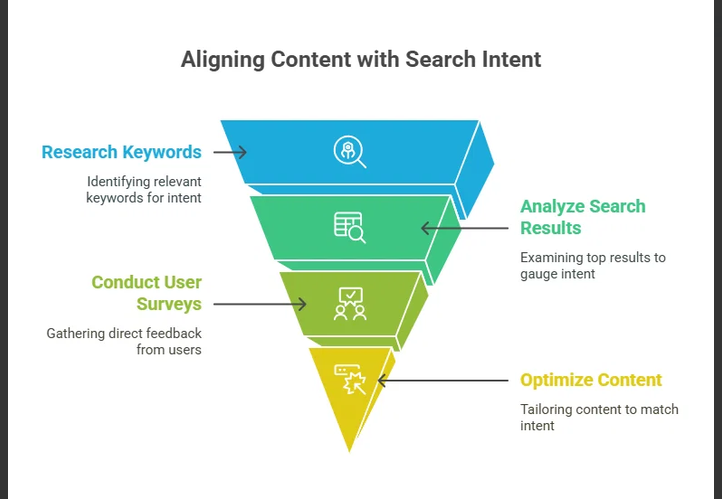
Strategic Value of Proper Keyword Research
- Connecting with High-Intent Audiences: Proper keywords allow marketers to target specific search intent—distinguishing between users looking for information ("how to style a WordPress theme") versus users ready to make a purchase ("best agency WordPress theme").
- Maximizing ROI on Content Creation: Ranking high on search engines requires dedicated time and resources. Keyword targeting ensures that content production efforts focus on topics with verified search volume rather than low-value topics.
- Informing Site Architecture & Navigation: Keyword clusters guide how pages, categories, and internal links should be structured. A well-organized site structure improves user navigation and helps search engine crawlers understand topical authority.
- Optimizing Paid Ads (PPC): In pay-per-click campaigns, choosing exact match and long-tail negative keywords directly prevents wasted ad spend on irrelevant clicks, significantly lowering cost per acquisition (CPA).
- Competitive Advantage: Analyzing competitor keyword gaps reveals underserved niches and long-tail opportunities that larger competitors may have overlooked.
Keyword Intent Breakdown
| Intent Category | Search Goal | Example Query | Primary Strategy |
| Informational | Learn a concept or fix an issue | How to fix CSS layout bugs | In-depth blog posts, tutorials, guides |
| Navigational | Reach a specific site/brand | Elementor login | Clean landing pages, branded SEO |
| Commercial | Research before buying | Frost vs Astra WordPress theme | Comparison tables, reviews, feature lists |
| Transactional | Complete a purchase or sign up | Buy domain name fast | Conversion-focused landing pages, clear CTAs |
FAQ
How do I perform a keyword gap analysis against competitors?
A keyword gap analysis identifies search terms that your direct competitors rank for, but your website either misses entirely or ranks poorly for.
1.Identify 3–5 Core Competitors:Prerequisite for accurate comparison data.
Select competitors into two distinct buckets:
- Direct Business Competitors: Brands offering identical products or services.
- Organic Search Competitors: Sites ranking at the top of Google for your target topics (even if they don't sell competing products, like industry blogs or news outlets).
2.Run a Gap Comparison Tool:Requires Semrush, Ahrefs, Moz, or Google Keyword Planner.
Enter your primary domain alongside 2–4 competitor domains into a dedicated Keyword Gap / Content Gap tool.
Set the location filter to match your primary target region (e.g., United States or United Kingdom).
3.Filter Results into Gap Categories:Focus on high-opportunity keyword sets.
Segment your raw comparison report into three primary views:
- Missing: Keywords where competitors rank in top 50, but your site does not rank at all.
- Weak: Keywords where both you and competitors rank, but competitors outrank you by 10+ positions.
- Shared (Top Positions): Keywords where you already outrank them (protect these rankings).
4.Apply Volume & Intent Benchmarks:Filter out irrelevant or unachievable terms.
Narrow down the "Missing" list by applying strict parameters:
- Search Volume: Filter for terms with meaningful search volume suitable for your niche (e.g., $>100$ monthly searches).
- Keyword Difficulty (KD): Focus on keywords where competitor Domain Ratings are comparable to yours.
- Intent Match: Group terms by commercial, transactional, or informational intent.
5.Map Gaps to Actionable Content Tasks:Execution phase.
Assign each target keyword group to an action item:
- Create New Pages: For "Missing" keywords requiring entirely new landing pages or blog posts.
- Update & Expand Existing Pages: For "Weak" keywords where adding new sections or updating metadata on current pages can reclaim rankings.
Key Metrics to Evaluate Opportunity
| Metric | What to Look For | Actionable Takeaway |
| Search Volume | High to moderate monthly query count | Indicates traffic potential |
| Keyword Difficulty (KD) | Equal to or lower than your domain strength | Indicates realistic chance to rank |
| Competitor URL Type | Product page vs. blog post | Dictates what page format you must build |
| Search Intent | Informational, commercial, transactional | Determines call-to-action and layout |
FAQ
How do I explain the trade-offs between long-tail and short-tail keywords in digital marketing?
The central trade-off in keyword selection balances reach versus relevance: short-tail keywords deliver high traffic volumes but lower conversion efficiency, while long-tail keywords deliver lower search volume with significantly higher user intent and conversion rates.
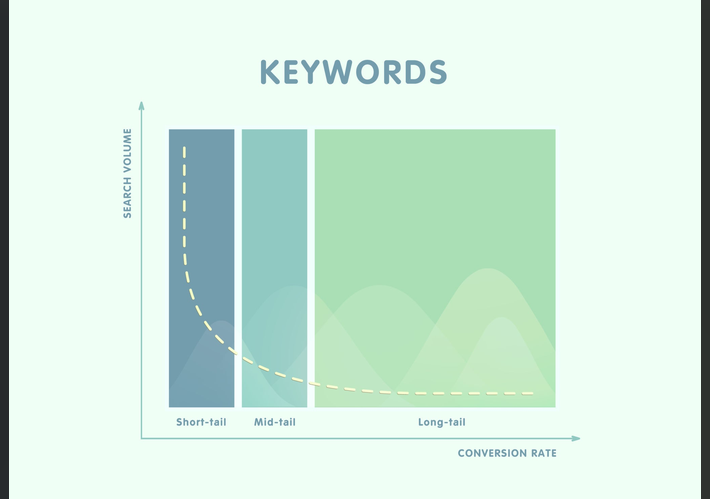
Direct Comparison
| Feature | Short-Tail Keywords | Long-Tail Keywords |
| Word Count | 1 to 2 words | 3+ words (often phrases or questions) |
| Example Query | WordPress themes | best lightweight block theme for blog performance |
| Search Volume | Very high (tens of thousands per month) | Low to moderate (tens to hundreds per month) |
| Search Intent | Broad / Ambiguous | Specific / Actionable |
| Competition | Extremely high (dominated by established domains) | Low to moderate |
| Conversion Rate | Low (typically 1%–2%) | High (often 5%–10%+) |
| PPC Cost-Per-Click (CPC) | Expensive due to high bidding competition | Lower cost per click |
| Time to Rank (SEO) | Months to years | Days to weeks |
Detailed Trade-Off Analysis
Short-Tail Keywords ("Head Terms")
- Pros:
- Brand Visibility & Awareness: Ranking for head terms establishes authority and puts your brand in front of thousands of top-of-funnel users.
- Broader Audience Capture: Drives massive raw site traffic, which can be useful for ad-monetized publishing sites or building retargeting lists.
- Cons:
- Vague Search Intent: A user searching for "shoes" could want history, manufacturing info, trends, or direct purchasing—making content targeting difficult.
- Resource Intensive: Requires significant domain authority, extensive backlink profiles, and high ad budgets to compete effectively.
Long-Tail Keywords
- Pros:
- High Conversion Rates: Users using specific queries know what they want and are further down the buying funnel.
- Faster SEO Gains: Lower keyword difficulty allows newer or smaller sites to rank quickly on page 1 of search results.
- Easier Content Alignment: Highly specific questions translate directly into targeted blog posts, FAQs, and product landing pages.
- Cons:
- Low Individual Volume: Single terms yield fewer total visitors, requiring a portfolio of dozens or hundreds of long-tail pages to aggregate major site traffic.
- Scalability Effort: Producing tailored content for multiple niche queries demands ongoing editorial planning and production effort.
Recommended Strategy: The "Hub and Spoke" Model
Instead of choosing one over the other, effective digital marketing strategies combine both using topical clusters:
- Pillar/Hub Pages: Target broad short-tail keywords on comprehensive overview pages (e.g., "Web Design Guide").
- Cluster/Spoke Content: Target long-tail keywords on specific articles or product pages (e.g., "How to customize navigation menus in WordPress block themes").
- Internal Links: Pass link equity from long-tail spoke pages back to the main short-tail pillar page to build overall topical authority.
FAQ
How do I design a topic cluster and pillar page model for my website?
Designing a topic cluster model requires organizing a broad overarching subject into a central "Pillar Page" supported by a network of specific "Cluster Content" pages, all connected through deliberate internal linking.
1.Select a Core Pillar Topic:Choose a high-level subject broad enough for 5–10 subtopics.
Identify a broad, short-tail head term relevant to your core business or service (e.g., WordPress Site Performance or Email Marketing).
- Ensure the term has high search volume.
- Confirm the topic can be naturally broken down into sub-components.
2.Conduct Cluster Keyword Research:Find specific questions, long-tail terms, and niche angles.
Brainstorm and research 5 to 10 subtopics targeting specific long-tail keywords associated with the main pillar.
- Use tools like AnswerThePublic, Semrush, or Google "People Also Ask."
- Focus on informational or transactional queries (e.g., How to optimize image sizes for web, Best caching plugins for WordPress).
3.Draft Content for Pillar and Clusters:Broad overview vs. deep-dive specifics.
Write and structure the content with distinct scopes:
- Pillar Page: Serves as an ultimate guide (typically 2,000–4,000+ words). It introduces every subtopic at a high level without going too deep into technical implementation.
- Cluster Pages: Deep-dive posts (1,000–2,000 words) that cover a single subtopic thoroughly with actionable, step-by-step detail.
4.Implement Internal Linking Architecture:The critical SEO connection that establishes topical authority.
Establish deliberate two-way contextual hyperlinks:
- Pillar to Cluster: Every subtopic section on the pillar page must link out to its corresponding cluster page using descriptive anchor text.
- Cluster to Pillar: Every cluster page must include a contextual link back to the main pillar page early in the body text.
- Cluster to Cluster: Interlink relevant cluster pages where naturally helpful for user navigation.
Example Topic Cluster Architecture
| Element | Component Role | Example URL & Target Keyword | Content Depth |
| Core Pillar | Central Hub Guide | /wordpress-performance-guide/(WordPress Site Performance) | High-level summary of speed factors, hosting, caching, and image optimization. |
| Cluster 1 | Subtopic Deep Dive | /how-to-optimize-images-wordpress/(optimize images wordpress) | Complete tutorial on WebP formats, compression plugins, and lazy loading. |
| Cluster 2 | Subtopic Deep Dive | /best-wordpress-caching-plugins/(best caching plugins wordpress) | Product comparisons, benchmarks, and configuration setups for top caching tools. |
| Cluster 3 | Subtopic Deep Dive | /reduce-unused-css-javascript/(reduce unused CSS wordpress) | Technical walkthrough on asset cleanups, code minification, and critical CSS rendering. |